Free · Beta
REAPER + Claude: an AI panel inside REAPER
REAPER + Claude is a free, open-source AI panel for REAPER 7: a chat powered by Claude Code that builds your mix session from a folder of audio, measures LUFS, balance and phase, and exports stems by family.
Download free on GitHubMIT license · REAPER 7 · Mac with Apple Silicon · Source code on GitHub
What it does
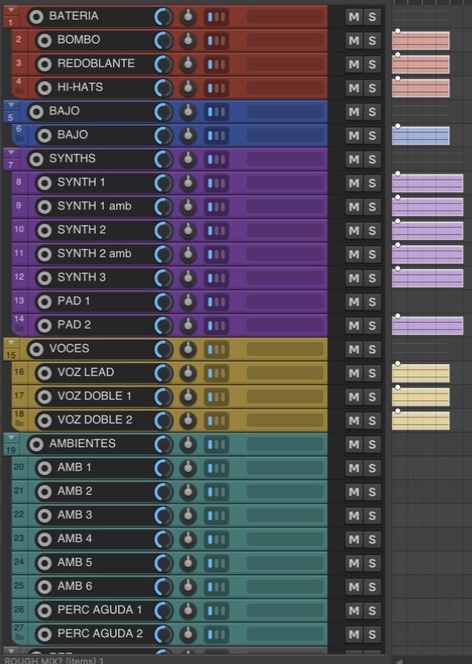
Builds the sessionGive it a folder of audio and it sets up the mix session in REAPER.
Sorts by familyCopies your audio sorted by family (drums, bass, vocals) with clear names.
MeasuresLoudness in LUFS, balance and phase for every file, in one sheet.
Stems by familyExports stems by summing the files per family, with no effects.
De-esser on a copyDe-esses vocals on a copy: the original is never touched.
Finds samplesSearches your own sample folders, read-only.
Who it is for
For people who mix and do not code. You type what you want in plain language, as you would to an assistant, and the panel handles the repetitive work. The AI measures, it does not listen: the judgment is yours.
What you need
- REAPER 7
- A Mac with Apple Silicon
- A Claude Pro plan or higher (you pay for it)
- Claude Code installed
Tested on REAPER 7 and Apple Silicon Mac; everything else is untested.
Setup in 4 steps
- Install REAPER and the ReaImGui extension.
- Get a Claude Pro plan or higher and install Claude Code.
- Download the repository ZIP and run the installer.
- Open the panel in REAPER, sign in and type your first request.
Want to see it step by step? Watch the free mix sessions class.
4 example requests
build a session from the audio files in /path/to/folder
de-ess the vocals
export stems by family
bring me a dry, short kick from my samples
For now the panel answers in Spanish; you can write to it in English.
Safety
- It only uses the cable command and reads files: no deleting, renaming or rendering unless you ask.
- Every action can be undone with Cmd+Z.
- It never sees or stores your Claude username, password or code: sign-in is Anthropic official login.
- Try it on a copy of your sessions, not on a client session.
Independent project by Estudio Velador, not affiliated with Anthropic. Claude and Claude Code are trademarks of Anthropic. REAPER is by Cockos.
Frequently asked questions
How do I use Claude with REAPER?
Install the ReaImGui extension and the panel, open the panel in REAPER, sign in to Claude Code and type what you want in plain language. The panel sends the actions to REAPER.
Is it free?
The panel is free and open source under the MIT license. The only paid part is a Claude Pro plan or higher, which you subscribe to yourself.
What can it do?
It builds the session from a folder of audio, sorts files by family, measures LUFS, balance and phase, exports stems by family, de-esses vocals on a copy and searches your own sample folders, read-only.
Does it work on Windows or an Intel Mac?
I do not know: it is only tested on REAPER 7 and an Apple Silicon Mac. Everything else is untested.
Do I need to know how to code?
No. You type what you want in plain language, as you would to an assistant, and the panel handles the repetitive work.
Does the AI mix for me?
No. It measures, it does not listen: the mixing judgment is yours. The panel handles the repetitive parts, like sorting, measuring and exporting.
Is it safe for my sessions?
It only uses the cable command and reads files: no deleting, renaming or rendering unless you ask, and every action can be undone with Cmd+Z. Try it on a copy, not on a client session.
Want to see how I use it in a real session?
Keep going here